
Asset Store Submission Guidelines
Last updated: May 20, 2026
Overview
This guide informs new and existing publishers about the technical compatibility requirements for products submitted to the Unity Asset Store. To ensure that content meets a consistent standard, the Asset Store team checks your incoming submissions against these guidelines during your product’s review. If your product is rejected, you need to fix any issues noted in the rejection before resubmitting it. While the Asset Store team intends the review process to catch and inform you of all the reasons why your product has been rejected, more issues might be found in your product even if your resubmission has addressed all the initial issues. The Asset Store team will not provide suggestions for features, design aspects, or further development of packages. If you have received a rejection, you can reply to the rejection email, for example, if you are not sure about the communicated issue or disagree with the rejection. Our Asset Store EULA and Asset Store Content Transparency outline other restrictions for Assets submitted to the Unity Asset Store.
In rare instances, even if your submission has gone through multiple resubmissions, some products might be deemed unfit for the Unity Asset Store. If you have any issues regarding your submission, package, or publisher account, please open a support ticket.
1. Content Restrictions
1.1 General
1.1.a Content submitted is professionally designed, constructed, and suitable for use in a professional development pipeline. The marketing presentation, visual quality of the content, and functional quality of the content are also subject to review.
1.1.b Packages do not throw any errors or warnings that originate from package content after setup is complete. Handled exceptions, or errors and warnings that do not affect the usability of the package, or errors and warnings that are due to Unity engine bugs, are acceptable; such cases are transparently and completely disclosed in the package's marketing data and documentation, with explanations or workarounds explained where applicable.
1.1.c Assets that depend on other products or packages must disclose this information in the description. Packages that depend on standard Unity Registry UPM packages must have this dependency correctly set up in the manifest. Assets that rely on other Asset Store packages must have this dependency correctly set up in the Publisher Portal. Additional restrictions may apply for UPM products - see 5.2.d.
1.1.d Your product’s title, description, keywords, folders, scripts, and documentation do not contain an excessive amount of spelling or grammatical mistakes. Text is readable and reasonably understandable.
1.1.e Submissions are not more than 6GB in size. Offerings distributed through the Unity Package Manager (UPM) must not exceed 700MB in size.
1.1.f Submissions to the 3D, 2D, VFX, Animation, and Template categories include demo scenes that showcase the package's content. Tool submissions that manipulate external assets (for example, audio files, texture files, mesh files) include sample assets for demonstration. These assets can be incorporated into submitted products for demonstration purposes.
1.1.g Packages are rejected if they include potentially non-secure content, such as proxy servers, handling of sensitive or identifying information, unsafe code, or other areas of an asset where safety cannot be reasonably guaranteed.
1.1.h Publication on the Asset Store is not guaranteed and is contingent on the Asset Store Content Operations team’s approval of each asset, in Unity’s sole discretion.
1.1.i The display of the Asset must not impact the integrity of Unity servers (i.e., Unity's end users are unable to access such Asset or otherwise experience difficulty), Unity may demand that the Provider fixes the Asset.
1.1.j Packages that include MCP or AI-connected functionality may only access or use developer, project, or customer data as necessary to provide the disclosed functionality to that developer or organization.
1.1.k Packages are rejected if developer, project, or customer data is used to train external or general-purpose models without explicit developer consent.
1.1.l Packages are rejected if their MCP or AI-connected functionality causes unreasonable degradation of Unity Editor performance or interferes with other Unity services or tooling.
1.2 Legal
1.2.a Your submission includes a Third-Party Notices text file listing fonts, audio, and other third-party components with dependent licenses. You are responsible for ensuring that dependent licenses are compatible with the Asset Store EULA and include a license file detailing the component that it is covering. The product description on the Asset Store also contains a notice stating the third-party licensing included in the package. For example:
"Asset uses [name of component] under [name of license]; see Third-Party Notices.txt file in package for details."
1.2.b Submissions do not contain dependent licenses that require a product to maintain open-sourced or limited usability in commercial products, such as GPL, LGPL, or any Creative Commons/Apache 2.0 license that requires attribution.
1.2.c If your submission includes an SDK that connects to an external subscription service, the SDK code must remain governed by the Asset Store EULA (or Unity-approved OSS terms). Access to the associated external subscription service may be governed by your own external Terms of Service or Service Level Agreement. However, any such alternative or additional license terms (including OSS terms) require review and written agreement by Unity before publication. All approved alternative terms must be clearly surfaced to the user in the package description and documentation.
1.2.d All submissions must comply with the use restrictions in Section 17 of the Unity Terms of Service. Publishers are responsible for reviewing and ensuring their submissions are in full compliance with these terms. Failure to comply can result in the rejection of your submission, removal of your asset from the Asset Store, and other actions as permitted under the Unity Terms of Service and Asset Store Publisher Agreement.
1.3 Versions of Unity
1.3.a New assets and updates to already published assets use Unity version 2022.3 or newer versions. All versions of Unity Editor can be found in the Unity download archive.
1.3.b If you are unable to make your package compatible across Unity versions, you can upload your package using multiple versions of Unity. Alternatively, you can provide reasoning why an asset is not compatible with a specific version of Unity within the description text. For example:
“Due to a bug in Unity 2022.3.5f1, [this asset or aspect of the asset] will not work.”
1.3.c New assets and updates to already published assets submitted using Unity Editor 6.5 or newer must support Universal Render Pipeline (URP) or High-Definition Render Pipeline (HDRP). We recommend to base your package on URP, with an optional .unitypackage bundled to provide settings for other pipelines (See also - Submission Guidelines, Section 2.2.a).
1.4 Restrictive Content and Lite products
1.4.a Submissions do not include any functionality that restricts users from using content or features to their full extent, including digital rights management (DRM), time restrictions, registration, or paying extra costs (such as subscription-based payments). Notwithstanding the foregoing, an exception is made for SaaS-connected SDKs, which are permitted to require account registration (i.e., login walls) and subscription-based payments. First-party API based solutions may use the Publisher’s Invoice API to authorize users, and may have functionally necessary or third-party limitations (e.g., API throttling), all of which must be transparently disclosed in the description and documentation of the package. Any SaaS account registration requirements or subscription costs must likewise be clearly and transparently disclosed to the user in the package description and documentation.
1.4.b Packages do not include watermarks or otherwise obstruct the use of the product.
1.4.c Submissions do not have any artificial limits implemented on functionality or usability. However, SaaS-connected SDKs are permitted to enforce usage-based limits (i.e., metering) provided that all such usage limits are transparently disclosed in the marketing description. You can provide a "lite" (smaller/cheaper/indie/free) version of your package with fewer features compared with the full product, provided that each included feature has identical functionality to your main product.
1.5 Applications and Services
1.5.a Until further notice, the Asset Store is not accepting any submissions that include executables (for example, .exe, .apk, or other executables), embedded inside the package or as separate dependencies located on other websites.
1.5.b Packages that include functionality using third-party APIs clearly describe how the API keys are stored within the package. Third-party API keys are not stored in ways that would incorporate the key into project builds (for example, inside any script or GameObject that would be included in a scene).
1.5.c Packages that interact with third-party APIs must have Terms of API usage and additional costs, if applicable, clearly and transparently portrayed at the top of the listing’s description and in the documentation.
1.5.d If you are an online service such as a monetization service, ad-network, back-end hosting service, analytics system, decentralization solution (including Web3 technology), a SaaS platform (including SaaS-connected SDKs utilizing login walls or metered usage), or other service where a variable amount of money changes hands after the user downloads your SDK or plugin, consider joining our Verified Solutions program here.
1.5.e Analytics collection must be opt-in, and customers must be permitted to opt out at any time.
1.6 Generative AI
1.6.a Submissions made with AI-aided generation tools have significant value and usability in a professional development pipeline. Submissions might be rejected if they contain anatomical errors that reduce the usability of the asset, resemble third-party and/or copyrighted work, plagiarize the art products of other Asset Store publishers, or do not provide significant value to customers. Content generated with the aid of AI, completely or in part, must transparently disclose this information in the marketing data. The specific AI tools used and the content generated using AI must be disclosed in the “AI description” field in plain terms, without marketing language, and describing all modifications made that add value beyond the result of the generation.
1.6.b Usage of generative AI for marketing material is allowed only if the primary essence or functionality of the package is accurately reflected. You may use generative AI to generate logos, background elements, or supplemental visuals for a coherent visual aesthetic. Disclosure of AI assistance or usage is not required in this case, but disclosure is still mandatory if any functional part of the asset is generated by or with the assistance of AI.
1.6.c Content generated by AI or AI-assisted content cannot use keywords or terms that would imply human effort (e.g., “drawn”, “hand drawn”, “painted”) in any part of the submission.
1.6.d Unity reserves the right to reject submissions that are mass-produced using AI and lack sufficient differentiation or unique value relative to the publisher's existing catalog.
2. Product Specifications
2.1 Organization
2.1.a Packages are nested under one "root" folder. Exceptions include assets in the folders outlined in the Special Folders and Script Compilation Order documentation (for example, "Gizmos" or "Editor Default Resources").
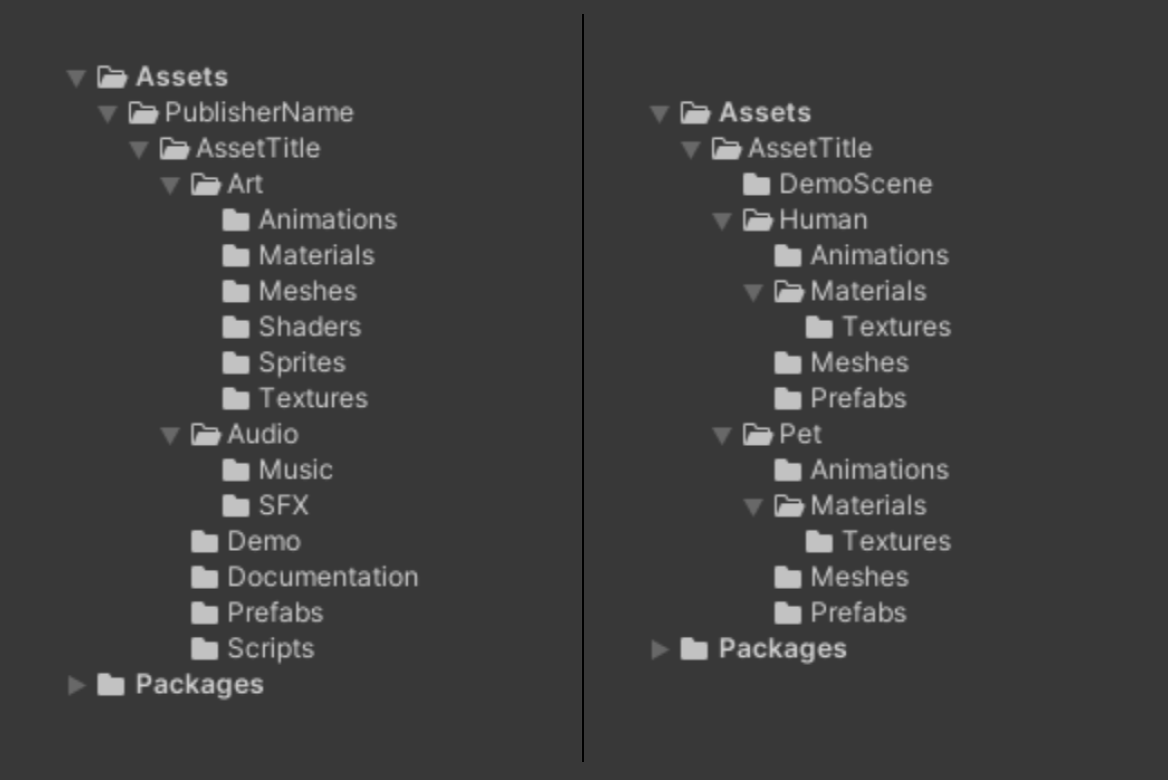
2.1.b Assets are sorted into appropriate folders. Folders are named depending on the type of assets they contain (for example, “Mesh”, “Script”, or “Material”). Packages do not have a large range of file types included under a singular folder, or a range of the same file types in unrelated folders. Package content is sorted by type (all meshes in one "Mesh" folder, all materials in one "Materials" folder, and so on) or by relationship (a folder called "Creature" containing meshes, materials, textures that apply to the Creature character, and so on)
Pictured: Two examples of organized and properly named folders.
2.1.c Packages do not contain any duplicate, unusable, or redundant files.
2.1.d Content is not included in any folder named "AssetStoreTools" or any variation of that name, because that folder is automatically removed when your content is uploaded.
2.1.e File names are not excessively lengthened. File paths for assets are under 150 characters.
For a UPM package path “Packages/com.example.package/Hello.cs”, it is the “com.example.package/Hello.cs” part that is being measured towards the limit.
For a .unitypackage package, measuring starts at the project’s root folder “Assets/” including the “Assets/” part itself.
2.1.f Multiple submissions by one publisher containing largely identical content to already published packages are rejected. Updates to published submissions are not contained in separate package drafts, unless a Major Upgrade system is set up. Packages that have similar content, but are aimed at different render pipelines, are exempt from this rule.
2.1.g Package bundles contain the entirety of the marketed content, or the Lite Edition system of Upgrades is set up for each published package that the bundle contains. For more information on how bundles are constructed, please visit this page.
(Access to the publisher forum required: access is available via a survey form received in the acceptance email when your first asset is published)
2.1.h Resubmitting previously rejected content without modification as an attempt to circumvent the vetting process is not allowed and might warrant publisher account termination. This applies to resubmissions via the same draft, as well as resubmissions of the same content in different drafts.
2.2 Compressed Files
2.2.a Submissions do not contain .unitypackage or archive files that obscure the majority of the content. Exceptions are made for .unitypackage files that include setup preferences, settings, supplemental files for other Asset Store products, or alternative render pipeline content.
2.2.b .zip files are acceptable if they contain files that do not natively function in the Unity Editor (for example, Blender, HTML Documentation, or Visual Studio Projects). Such files include "source" in the file name (for example, "Blender_source", "PSDSource", etc.)
2.3 Documentation
2.3.a Documentation is required if your package includes code or shaders, has configuration options, or requires setup; it must be comprehensive. Local (offline) documentation is strongly recommended and may be required for certain categories of products.
2.3.b Documentation files use .txt, .md, .pdf, .html, or .rtf. file types.
2.3.c Video documentation or tutorials are not included in your package, but may be hosted on online services (e.g., YouTube, Vimeo).
2.4 Art
2.4.a Mesh assets are either .fbx, .dae, .abc, or .obj file types.
2.4.b All visible meshes have a paired set of textures and/or materials assigned to them. A corresponding prefab is also set up with variations of textures/meshes/materials.
2.4.c Large environments and models with many distinct geometries are broken up and put into individual containers (e.g., .fbx).
2.4.d Prefabs have their position/rotation set to 0, and their scale set to 1. Meshes have their positive Z axis facing forward.
2.4.e Meshes are at a 1 unit: 1 meter scale.
2.4.f All meshes have a local pivot point positioned at the bottom center of the GameObject, in the same corner of any modular objects, or where the object would logically pivot/rotate/animate.
2.4.g Before submission, photoscanned or AI-generated data is retopologized and optimized to a state that users can edit if needed.
2.4.h Assets do not have an unreasonably excessive mesh density or topology that can inhibit mesh deformation quality.
2.4.i Models marked as "Static" have colliders assigned to them. Colliders fit the model's size.
2.4.j Models with level of detail (LOD) meshes have prefabs that contain an LOD Group component with all the LOD meshes set up.
2.4.k Rigged 3D models have anatomically accurate or otherwise reasonable and smooth weight painting.
2.4.l Models or images do not contain genitalia. Characters must have sufficient coverage as appropriate.
2.4.1 Animations
2.4.1.a Character models are weighted to an accompanying rig. The rig is either set up with Unity’s Mecanim system or includes your own animations.
2.4.1.b When set to animations, rigs do not show any obvious creases or unusual deformations.
2.4.1.c Bipedal (humanoid) characters are correctly mapped with Unity’s default “Humanoid” rig or include their own generic animations, provided that this is transparently disclosed in the marketing data.
2.4.1.d Animations are sliced before submission so that submissions do not contain a single, long animation clip.
2.4.1.e Each animation clip has a unique name.
2.4.1.f Submissions do not include unprocessed, unsliced, or reasonably unusable animations developed from motion capture (mocap) data.
2.4.1.g Animations have fluid movement without any jarring transitions.
2.4.1.h Animation asset submissions have a video demonstration in their marketing material, showcasing the included animations.
2.4.2 Sprites and Particles
2.4.2.a Sprite sheets are imported with the “Sprite” import settings, correctly sliced and named.
2.4.2.b Sprite animations are spliced, named, and set up as proper clips.
2.4.2.c Particle systems are saved as prefabs.
2.4.3 Textures, Materials, and GUI Packs
2.4.3.a Image files are in a lossless compression format such as .png, .tga, .psb, or .psd. Exceptions are assets in the Tools, Add-Ons, and Audio categories.
2.4.3.b Packages using physically based rendering (PBR) include at least one texture map (as a separate or packed map) from the following list: albedo, normal, metallic (or specular), or smoothness (or roughness).
2.4.3.c Tileable textures tile without any seams or obvious edges.
2.4.3.d Textures and materials are optimized and usable.
2.4.3.e Maps with an alpha channel are paired with a shader that can read that channel. Materials are paired with a shader that supports backface rendering, where backface culling produces visible mesh holes.
2.4.3.f Normal maps are marked as a “Normal Map” in the import settings.
2.4.3.g .sbsar files and other procedural materials have documentation or a demo scene showcasing their parameters.
2.4.3.h Dimensions of textures have pixel counts that are a power of 2 when appropriate.
2.4.3.i Materials include all appropriate textures and are properly set up.
2.4.3.j GUI components have their elements separated and named either before import or through the Unity Editor’s Sprite Editor settings.
2.5 Scripts
2.5.a All code is contained in user-declared namespaces. Code cannot be contained in official Unity namespaces or those that include Unity or any other trademarks. You can find more information about namespaces in Microsoft's C# documentation.
2.5.b Assets that support Android build target 64-bit architecture.
2.5.c Submissions do not contain script files in unsupported programming languages.
2.5.d Script files should be editable, readable, and easily modifiable or built upon by customers. Packages that include unreadable, hard-to-modify code might be rejected. Obfuscating code that is not intended to be modified is acceptable.
2.5.e Scripts are written in a consistent style. The cases of code entity names are consistent for their type (e.g., ClassName, FunctionName, variableName, CONSTANT).
2.5.f Names of namespaces, interfaces, classes, functions, or other code entities that are intended for end-users are spelled correctly.
2.5.g Offerings must not use Unity Editor internal APIs discovered through reflection or similar mechanisms.
2.5.h Starting with Unity Editor version 6.6, all packages, including any sort of scripts, must support entering Play mode with the Domain Reload setting disabled (Fast Enter Playmode).
2.5.i At the time of submission, your package must not contain any deprecated or obsolete API warnings on the latest supported Unity Editor version.
2.5.1 Editor Scripts
2.5.1.a File menus are placed under an existing menu, such as "Window/<PackageName>". If no existing menus are a good fit, they are placed under a custom menu called "Tools".
2.5.1.b Unique windows are for practical support, technical or informative purposes (such as supplying the user with documentation), functionality, or guidance. Unique windows are not solely for marketing purposes or information not directly associated with the product.
2.5.1.c Submissions that use a server-based plugin automatically populate any new databases with the necessary tables.
2.5.1.d Submissions do not contain any scripts that, upon import and at any other point, automatically and/or without user consent redirect users outside the Unity Editor, such as a website or other hyperlinks/deep links. Methods using the InitializeOnLoad attribute must serve a functional purpose in the context of the package itself, such as setup, settings, or tutorial Unity Editor windows, and may not be used to forward users outside the Unity Editor directly.
2.5.1.e Offerings must not programmatically add, update, or remove packages in user projects, except for packages included in the offering's own Asset Store product.
2.6 Essentials and Templates
Please note that the guidelines in sections 2.1 - 2.5 and 2.7 also apply to the content of Template packages according to file type.
2.6.a Essentials and Template projects are designed as instructional, tutorial, or framework products.
2.6.b Essentials and Template projects have visual content or functionality displayed in a demo scene.
2.6.c Documentation includes in-depth information about how the project is designed and how users can edit and expand on your project.
2.7 Audio
2.7.a All audio asset submissions include a preview in the artwork section.
2.7.b Audio files are clear and audible. Audio tracks do not exceed -0.3 dB on peak meters.
2.7.c Audio products under the Audio or Templates category use a lossless file format such as .wav, .aiff, or .flac. Submissions do not contain files in .mp3 or .ogg format, unless they are submitted together with the included lossless files or are used for demonstration purposes in the Tools and Add-ons categories.
2.7.d SFX audio files do not contain background noise or excessive silence at the start or the end of an audio file, and are sliced into units.
2.7.e Packages that include audio files of each instrument and/or instrument group as a part of a whole soundtrack (also known as stems) are allowed. If stems are included in the submission without the original, full audio piece only, this information must be transparently disclosed in the description.
2.8 Platform Compatibility
2.8.a Offerings must be designed for Unity Supported Platforms as defined in the Unity Editor Software Terms.
2.8.b Offerings targeting or facilitating use on non-Unity Supported Platforms require Unity's prior written consent.
2.8.c Unity may reject Offerings it determines are designed to circumvent supported platform requirements.
3. Product Marketing
3.1 Description
3.1.a Description text accurately covers all important aspects or key features of your product, including dependencies, intended functionality, and requirements for use of the asset. Any limitations, which are not reasonably expected, and influence the usability of the asset, are clearly and transparently disclosed in the marketing data; failure to disclose features and limitations transparently might warrant a refund and deprecation of the package. Submissions with purely AI-generated descriptions can be rejected.
3.1.b Description text for art assets lists the number of unique assets or asset types included in your product. Technical details, such as the audio sample rate, track length, bit depth, 3D model polygon count, texture/sprite dimensions, supported render pipelines, and types of texture maps included for each asset are also provided.
3.1.c Packages with several editions (e.g., lite/pro) include a comparison of the features between the versions in the description, technical details, or artworks/images, as a list or summary.
4. Publisher Guide
4.1 Publisher Information
4.1.a Publishers have an active email address and an actively maintained website that shows relevant work and skill sets.
4.1.b Inactive links (such as email or website) may be grounds for package deprecation with no prior warning.
5. UPM
5.1 Publisher Enrollment
5.1.a All publishers enrolling for UPM must pass third-party identity verification.
5.1.b Unity reserves the right to reject enrollments that attempt to claim namespaces that may imply affiliation with other entities without sufficient proof.
5.1.c Publishers enrolling as a business or as a business representative must provide a valid DUNS number, company address, and a registered and active website domain.
5.2 UPM Validation
5.2.a Package assembly definitions should have associated scripts, and scripts should be associated with assemblies.
5.2.b Package assembly files should be a valid JSON file.
5.2.c Packages may only include dependencies on Unity packages or other packages already included in the same published product.
5.2.d Package assets should contain metafiles, and no redundant metafiles should exist.
5.2.e The package manifest must contain at least the following fields: ‘name’, ‘displayName’, ‘version’, ‘unity’, ‘unityRelease’, ‘author’, ‘description’.
5.2.f The ‘name’ field of your package manifest should be valid and relevant.
5.2.g The ‘version’ field of your package manifest should be a valid semantic versioning string.
5.2.h The ‘unity’ and ‘unityRelease’ fields of your package manifest should be defined and accurately reflect the compatibility of your package with Unity versions.
5.2.i The ‘author’ field of your package manifest should be set to your Asset Store publisher name.
5.2.j The ‘description’ field of your package manifest should be set, informative, and meet all other guidelines.
5.2.k The ‘displayName’ field of your package manifest should be set, accurately represent the intended function of your package, and meet all other guidelines (See Section 3. Product Marketing).